What Happened
Many small and mid-sized businesses still run critical operations through shared inboxes. Orders, vendor questions, customer requests, internal approvals, warranty notes, scheduling changes, billing questions, and document updates all land in the same place. The inbox becomes a general-purpose intake counter for the company. It is flexible, familiar, and easy for people to use, but it is also difficult to manage when volume grows. Important requests sit next to newsletters. A message that needs a same-day answer may look similar to a message that can wait a week. A team member may remember context from a prior email, while another person sees only the latest message and makes a different decision.
The usual response is to add folders, flags, color labels, and manual rules. Those tools help, but they do not solve the real problem. Shared inbox work is not only communication. It is classification, prioritization, routing, evidence gathering, status tracking, and follow-up management. When those steps depend on whoever happens to open the email first, the company gets uneven service. Some requests are handled beautifully. Others drift because the next action is unclear.
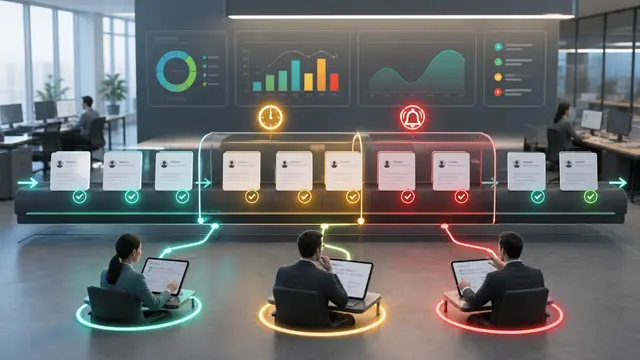
An AI intake triage desk changes the role of the mailbox. Instead of asking people to read every message from scratch, the workflow creates a first pass that summarizes intent, extracts entities, estimates urgency, checks for missing information, and recommends the next queue. The human team still owns the decision. The automation simply turns an undifferentiated stream of messages into a practical workbench.
This is especially valuable for companies that are not ready to replace email with a heavy ticketing system. Many teams need something lighter. They need a way to preserve the convenience of email while adding operational discipline around what happens after the message arrives. AI makes that possible because it can interpret messy language, recognize patterns across messages, and prepare structured records for the systems the business already uses.
Why It Matters for Businesses
A shared inbox is often the first place where operating risk becomes visible. If a customer sends three messages about a late order, the inbox knows before the weekly account meeting does. If a vendor keeps asking for updated purchase order details, the inbox sees the friction before the finance team measures the delay. If employees repeatedly ask how to complete a policy step, the inbox reveals a process gap that may not appear in a dashboard.
The problem is that inbox information is rarely measured well. Leaders may know the team feels busy, but they may not know which request types consume the most time, which departments create avoidable back-and-forth, or which customers experience repeated handoffs. Without structure, email volume feels like noise instead of evidence.
An AI intake triage desk helps by turning each message into a small operating record. That record can include request type, customer or vendor name, order number, due date, missing attachments, likely owner, sentiment, escalation risk, and recommended response path. Once that structure exists, the business can see patterns that were previously buried in threads.
The measurable impact can be significant:
- Faster first response because messages are sorted by intent and urgency.
- Fewer missed handoffs because ownership is assigned earlier.
- Cleaner CRM and operations data because extracted details are captured consistently.
- Better staffing decisions because leaders can see demand by category, not only total email count.
- Stronger customer experience because repeated issues are surfaced before they become complaints.
The most important business benefit is not that AI writes emails faster. It is that the team stops treating every message as a blank page. People begin their work with context, suggested next steps, and a clearer view of risk.
The Practical Automation Opportunity
The practical implementation should start with a narrow set of inbox categories. A company might begin with order status requests, invoice questions, customer service escalations, vendor document requests, and internal approval reminders. Each category should have a defined owner, service expectation, required data fields, and escalation rule. If those rules are unclear, AI will only make the confusion faster.
A strong workflow usually includes six layers. The first layer captures every new message and stores the original content unchanged. The second layer classifies the message by business intent. The third layer extracts key fields, such as account name, order number, invoice number, promised date, product, region, or department. The fourth layer checks whether required information is missing. The fifth layer routes the item to the right queue or person. The sixth layer creates a follow-up reminder if no action happens within the expected window.
Human review belongs in the middle of the process, not only at the end. For example, AI can suggest that a message is a billing dispute, but a team member should confirm before the workflow changes account status or sends a customer-facing response. The goal is guided work, not uncontrolled autonomy.
Companies should also build a feedback loop. When a user corrects the category, changes the priority, or reassigns ownership, that correction should be captured. Over time, the workflow becomes more aligned with how the business actually operates. Even without complex model training, the company can improve prompts, routing rules, and exception lists based on real corrections.
Reporting should stay simple at first. Track volume by category, median time to first action, number of messages missing required details, reopen rate, and aged unassigned items. Those metrics are enough to prove whether the triage desk is reducing friction. They also help leaders find the next automation opportunity. If one category consistently requires the same document, the business can add a form. If one customer creates repeated escalations, account management can intervene. If one internal process creates confusion, operations can fix the source.
Security and privacy controls matter because inboxes often contain sensitive details. Access should follow existing mailbox permissions. The workflow should avoid exposing message content to unnecessary users. Logs should show who approved, reassigned, or responded. AI summaries should link back to the original message so people can verify context before acting.
A useful way to keep the project grounded is to design the first version around decisions the team already makes every day. For each mailbox category, document what a skilled employee looks for before acting. In an order question, that may include customer name, order number, promised date, shipment status, and whether the customer has already contacted the company. In a vendor document request, it may include vendor name, contract reference, requested document, due date, and whether the request affects payment or service delivery. In an internal approval reminder, it may include requester, department, dollar amount, policy threshold, and the person blocking the next step.
Those details become the extraction checklist. AI should not simply summarize the message in a friendly paragraph. It should prepare the fields the business needs to move work forward. If the field is present, the workflow captures it. If the field is missing, the workflow asks for it or marks the item incomplete. This is where ROI begins, because the team spends less time rereading messages and less time sending avoidable clarification emails.
The first response template should also be managed carefully. Many teams want AI to reply automatically on day one, but a safer starting point is a draft response queue. AI can prepare a short acknowledgment, request missing information, or suggest an internal handoff note. A person reviews and sends. After the business understands accuracy, categories with low risk can move to more automation. For example, a missing invoice attachment request may be safe to automate, while a complaint from a high-value customer should remain human-led.
The workflow should include exception categories that prevent quiet mistakes. Messages with legal language, cancellation threats, payment disputes, personal data, angry sentiment, executive contacts, or unclear intent should be routed to a review lane. The company can define these categories in plain language and refine them as real cases appear. This makes the system more trustworthy because employees know sensitive work will not be treated like routine traffic.
Training is as important as configuration. Team members need to know what the AI output means, when to trust it, and how to correct it. A simple correction button can capture wrong category, wrong owner, missing field, wrong urgency, or duplicate thread. Managers should review corrections weekly during the pilot. That review will reveal whether the automation needs better prompts, cleaner mailbox rules, or clearer business ownership.
For ROI, measure before and after using the same definitions. Track average messages per day, percent classified automatically, percent requiring correction, time to first owner assignment, time to first customer response, number of aged unassigned items, and number of messages missing required fields. If the inbox touches revenue, also track opportunities created, orders protected, disputes resolved, or renewal risks surfaced. If it touches service, track escalation rate and repeat contacts.
The strongest deployments treat the inbox as one front door into a broader operating system. A triaged customer request can create a CRM task. A vendor document issue can create a procurement reminder. A billing dispute can open an accounting review. A recurring employee question can become a knowledge base improvement. AI handles the interpretation step, while automation creates the operational follow-through. That combination is what turns the mailbox from a pile of messages into a controlled intake desk.
Business Takeaway
A shared operations mailbox is not just an email problem. It is a coordination system that usually grew without design. AI and automation can make that system measurable, accountable, and easier to manage without forcing the company into a major platform change.
The best first project is not an automated reply bot. It is an intake triage desk that helps people see what arrived, what it means, who owns it, and what needs to happen next. When the workflow is designed around human judgment, clear queues, and practical metrics, the business gets faster response times and better visibility without losing control.
For many companies, this is one of the highest-ROI starting points for AI automation because the data is already there, the pain is familiar, and the improvement can be measured within weeks.