What Happened
A website form is a beginning, not a finished lead record. The visitor may describe an urgent problem in an open text field, select a generic service, return after reading several pages, or submit a company address that suggests a different market than the form category. When routing relies only on a territory field or a round-robin rule, businesses risk sending valuable inquiries to the wrong person or responding with a message that ignores the visitor’s stated need.
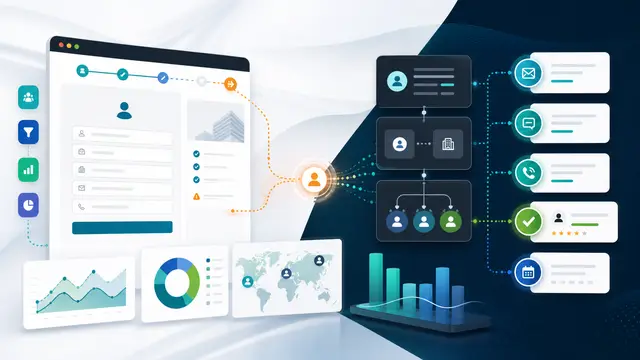
AI can summarize the inquiry, identify the likely intent, detect useful context from permitted first-party behavior, and recommend the next action. Automation can then create the right CRM record, notify the appropriate team, schedule a response commitment, and preserve a traceable handoff. The useful outcome is not more leads in a database. It is a quicker start to the right conversation.
Why It Matters for Businesses
Speed matters, but speed without relevance can damage trust. An enterprise prospect requesting implementation guidance should not receive the same sequence as a local customer seeking a service appointment. A support request should not be counted as a sales lead. A partner inquiry should not disappear into a general queue. The resulting delays are often invisible because the website, CRM, marketing platform, and inbox each show only part of the journey.
Routing design should make the customer promise explicit. Decide which kinds of inquiry need an immediate acknowledgement, which need a specialist, which can enter nurturing, and which must be handled as service or privacy matters. Automation becomes valuable when it enforces that promise across channels.
The Practical Automation Opportunity
Begin by defining a practical intent taxonomy, such as new purchase, urgent service, existing-customer support, partnership, media, employment, and general inquiry. Pair it with firmographic and routing rules that are understandable to the team. An AI classifier can propose an intent and brief rationale from the submitted message. A deterministic workflow should then apply ownership, service-level targets, consent handling, deduplication, and notification rules.
Give the recipient enough context to respond well: the inquiry summary, source page, relevant products or services viewed when consent permits, existing account relationship, and a suggested first question. Do not overload the alert with a noisy behavioral dossier. The goal is informed service, not surveillance.
A commercial maintenance business might receive a nighttime form from a facility manager reporting a critical issue. The flow identifies language indicating urgency, checks whether the domain belongs to an existing customer, creates a service case rather than a campaign lead, and alerts the on-call team with the message and location. By contrast, a visitor downloading a planning guide and requesting a consultation is routed to business development with an agreed follow-up window and a concise account profile.
Both paths begin on the same website, but they honor different needs. That distinction protects response time, sales productivity, and the customer experience.
Use explicit consent and privacy rules for every signal included in routing. Keep the classifier’s role limited to recommendation and clearly log the selected intent, confidence, routing rule, owner, and changes made by a person. Establish fallback routing for low-confidence cases and a monitored queue for failures. Test forms, integrations, and notification paths regularly, especially after website changes.
Measure median response time by intent, percent routed correctly on first assignment, conversion by source and route, abandoned high-intent inquiries, reassignment rate, and the share of low-confidence cases. Review sample conversations to ensure the automated summary is accurate and useful. A routing model is successful when it improves the first human response, not when it produces an impressive score in isolation.
Practical implementation is easiest when the team begins with a workflow boundary that can be observed. Name the trigger, the records involved, the person accountable for an exception, the deadline, and the final system of record. Draw the current handoff before choosing a model or a platform. That exercise usually reveals missing decisions, duplicate entry, and unclear ownership that no technology can solve by itself. A useful pilot has a limited scope, a baseline measure, and an agreed stop condition if accuracy or control quality falls below expectation.
Design the experience for the people receiving the work. A good automation message states what happened, why it was routed, what evidence is available, what decision is requested, and when it is due. It should link to the record rather than force people to search. It should avoid jargon and overconfident language. When the workflow makes human judgment easier, adoption grows because staff see it as operational support rather than an extra monitoring layer.
Integration quality matters as much as model quality. Use stable identifiers, define what happens when a connected system is unavailable, and prevent loops that create duplicate cases or notifications. Test ordinary scenarios as well as edge cases: incomplete input, conflicting records, a reassigned owner, an overdue task, a withdrawn request, and a reviewer who rejects the AI suggestion. Capture the results of those tests in a simple operating guide so the process survives personnel changes.
Roll out in stages. First run the workflow in observation mode and compare its recommendations with the team’s actual choices. Next allow it to create reviewable drafts and routing tasks. Only after evidence shows reliable performance should low-risk actions become automatic. Review exceptions weekly during the first month. The feedback is not a nuisance; it is the data needed to improve prompts, rules, data definitions, and training.
Create an adoption plan alongside the technical plan. Identify the operational owner, the process owner, the data owner, and the executive who can remove cross-functional blockers. Those roles may sit with the same person in a smaller organization, but the responsibilities should still be explicit. The operational owner monitors queues and daily failures. The process owner decides whether the workflow is achieving its intended customer or business outcome. The data owner resolves questions about definitions and authority. The executive sponsor helps when one team’s local optimization creates work for another team.
Document the decisions that define a good outcome. For example, specify the maximum response time, the level of evidence required before a case changes state, the circumstances that require escalation, and the person permitted to override a rule. This definition gives reviewers a way to identify failure early. It also prevents a pilot from being judged solely by anecdotal enthusiasm. If a workflow reduces manual effort but increases silent mistakes, the evidence should make that tradeoff visible.
Training should use realistic scenarios instead of a feature tour. Show a recipient how to understand the automated summary, where to find source context, when to accept a recommendation, and how to report an error. Explain what the automation does not do. People are more likely to use an assistant responsibly when they know its boundary and understand that a confident-looking suggestion is still a suggestion. A short feedback form attached to each early exception can uncover patterns that a volume metric cannot show.
Plan for the neglected cases. A business process has weekends, staff absences, duplicate submissions, system maintenance, and requests that do not fit a category. Decide how the queue behaves when no owner is available and how an issue moves to a human triage team. Establish a regular review for rules that are no longer valid. Automation is not a one-time installation; it is a managed service that needs governance, ownership, and periodic redesign as the business changes.
Use a simple scorecard at the end of each pilot cycle. Include the workflow volume, accuracy sample, time-to-action, exception age, user feedback, control findings, and outcome metric tied to the original problem. Review it with the people doing the work, not only the project team. Their experience often reveals a constraint that transaction data misses, such as an alert arriving at the wrong time or a case requiring context from a system the integration does not reach. The next iteration should address the highest-impact constraint before expanding scope.
Communication is part of control design. Tell affected teams what will trigger the workflow, what information it can use, how recommendations are generated, and where they can ask for help. Publish a short escalation path for unexpected outcomes. When a rule is changed, record the reason, the date, the approver, and the expected effect. That change record helps the organization distinguish a process improvement from an unexplained shift in results. It also makes later reviews faster because the team can connect performance changes to deliberate operational decisions.
Finally, calculate value in business terms. Estimate time removed from rekeying, searching, chasing, and status meetings. Compare response or resolution times before and after the change. Watch for rework, errors, customer complaints, control failures, or work shifted to another team. A credible ROI story includes those safeguards. It explains not only what became faster, but also what became easier to govern and more dependable for customers and employees.
Business Takeaway
Website automation earns its place when it translates a visitor’s need into an accountable next step. Start with a small intent taxonomy and transparent routing rules, then add AI summaries where they help a person respond faster. The strongest system is one customers experience as prompt, relevant, and respectful.