What Happened
Equipment downtime creates two problems at once. The operational team must diagnose and repair the issue, while the customer-facing team must explain what is happening, who is affected, and what comes next. Many businesses focus on the repair path and treat communication as a secondary task. That choice often costs trust. Customers notice the impact before they hear from the company. Account managers scramble for updates. Service teams answer the same questions repeatedly. Leadership asks for a status summary that no one has time to prepare.
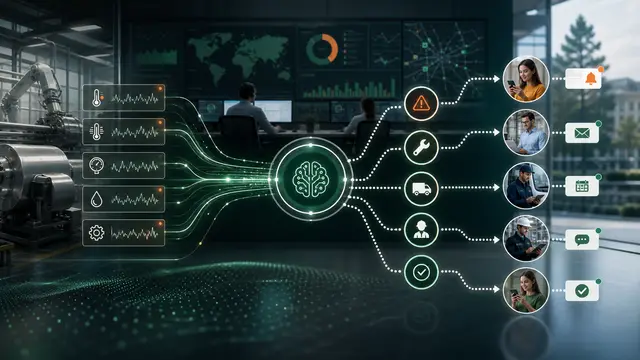
AI and automation can create a proactive downtime communication workflow that starts when equipment signals, service tickets, monitoring alerts, or technician notes indicate customer impact. The workflow does not need to diagnose every technical detail. It needs to translate operational signals into clear internal coordination and timely customer communication.
The first step is classification. Not every downtime event deserves broad outreach. Some issues affect one location, one customer, one production line, or one promised delivery. Others affect service availability or commitments across many accounts. A workflow can classify likely impact based on equipment type, customer dependencies, open orders, service-level commitments, geography, and current status. AI can summarize technician notes and monitoring alerts in business language, while automation routes the event to the right communication owner.
This is useful in manufacturing, field service, facilities, logistics, managed services, and any operation where equipment performance touches customer promises. The workflow creates a shared view of what is known, what is uncertain, who is affected, and when the next update is due. That shared view keeps people from improvising under pressure.
The best systems are careful about confidence. If the root cause is not confirmed, the message should say that internally and avoid pretending otherwise. If the estimated resolution is uncertain, the workflow should request a reviewed update instead of sending a guess. AI can draft messages, but customer-facing statements should follow approved communication rules.
Why It Matters for Businesses
Downtime communication matters because silence creates its own story. When customers discover a problem before hearing from the business, they assume the company is disorganized or hiding something. Even when the repair is handled well, poor communication can damage renewal confidence, increase support volume, and create unnecessary escalation.
Internal coordination is just as important. Operations may understand the technical issue, but sales and customer success need the commercial context. Which customers have deadlines today? Which accounts have open complaints? Which service commitments are at risk? Which leaders need to know before a customer calls them? Without automation, that context is assembled manually while the situation is already moving.
The ROI comes from reduced inbound calls, faster customer updates, fewer duplicate status meetings, lower escalation volume, protected service credits, and better account trust. It also shows up in employee time. A standard communication workflow prevents account managers from chasing operations for every update and prevents technicians from being pulled into repetitive status explanations.
A proactive workflow also improves post-incident learning. The business can track how quickly events were classified, how many customers were contacted before they opened a ticket, whether updates arrived on schedule, and which messages reduced confusion. Over time, the company can improve both the equipment response and the communication model.
For regulated or high-stakes industries, communication governance is essential. The workflow can ensure that messages are reviewed, approved, logged, and consistent with contractual obligations. That protects the business while still giving customers timely information.
The Practical Automation Opportunity
A practical downtime communication workflow includes several parts.
- Event intake from monitoring alerts, maintenance systems, service tickets, technician notes, or operations dashboards.
- Impact mapping that connects equipment, locations, products, customers, orders, contracts, and promised service windows.
- AI-generated internal summaries that separate confirmed facts, likely impact, unknowns, and recommended next update time.
- Routing rules that assign ownership to operations, account management, customer success, service leadership, or communications.
- Approved message templates for different impact levels, with human review for sensitive accounts or uncertain events.
- Update timers that prevent a first message from becoming the last message.
- Post-incident reporting that measures communication speed, customer response, escalation volume, and root-cause themes.
Start by identifying the downtime scenarios that create the most customer confusion. Do not begin with every machine or every possible alert. Choose the events where proactive communication would clearly reduce inbound pressure or protect a relationship. Map the data needed to answer four questions: what happened, who is affected, what are we doing, and when will we update again?
AI should help convert technical detail into business-ready context. A technician note may contain abbreviations, part numbers, and operational assumptions. AI can draft a plain-language internal summary and suggest customer impact, but the system should mark any uncertain claims for review. This keeps communication useful without overstating precision.
Automation should enforce cadence. Once an event is opened, the workflow should set the next update deadline, alert the owner before it is missed, and close the loop only when the event is resolved or no longer customer-impacting. The system should also record what was sent and when. That history helps teams answer customer questions and review performance later.
The workflow can mature into prevention. If certain equipment repeatedly triggers customer communication events, leadership can see the business impact in a way that maintenance logs alone may not show. Downtime becomes not only a repair metric but a customer trust metric.
Business Takeaway
Customers do not expect every operation to be perfect, but they do expect the business to communicate before uncertainty becomes frustration. AI and automation help companies turn equipment downtime signals into organized, timely, and governed communication. The practical win is not only faster messaging. It is a calmer operating model where teams know who is affected, what can be said, and when the next update is due.
A useful next step is to document the manual decision exactly as it happens today, including the trigger, the data checked, the person who approves the action, the message sent, and the metric reviewed afterward. That map prevents automation from becoming a vague technology project. It makes the workflow concrete enough to pilot, measure, and improve without disrupting the rest of the business.
A useful next step is to document the manual decision exactly as it happens today, including the trigger, the data checked, the person who approves the action, the message sent, and the metric reviewed afterward. That map prevents automation from becoming a vague technology project. It makes the workflow concrete enough to pilot, measure, and improve without disrupting the rest of the business.
A useful next step is to document the manual decision exactly as it happens today, including the trigger, the data checked, the person who approves the action, the message sent, and the metric reviewed afterward. That map prevents automation from becoming a vague technology project. It makes the workflow concrete enough to pilot, measure, and improve without disrupting the rest of the business.
A useful next step is to document the manual decision exactly as it happens today, including the trigger, the data checked, the person who approves the action, the message sent, and the metric reviewed afterward. That map prevents automation from becoming a vague technology project. It makes the workflow concrete enough to pilot, measure, and improve without disrupting the rest of the business.
A useful next step is to document the manual decision exactly as it happens today, including the trigger, the data checked, the person who approves the action, the message sent, and the metric reviewed afterward. That map prevents automation from becoming a vague technology project. It makes the workflow concrete enough to pilot, measure, and improve without disrupting the rest of the business.
A useful next step is to document the manual decision exactly as it happens today, including the trigger, the data checked, the person who approves the action, the message sent, and the metric reviewed afterward. That map prevents automation from becoming a vague technology project. It makes the workflow concrete enough to pilot, measure, and improve without disrupting the rest of the business.
A useful next step is to document the manual decision exactly as it happens today, including the trigger, the data checked, the person who approves the action, the message sent, and the metric reviewed afterward. That map prevents automation from becoming a vague technology project. It makes the workflow concrete enough to pilot, measure, and improve without disrupting the rest of the business.
A useful next step is to document the manual decision exactly as it happens today, including the trigger, the data checked, the person who approves the action, the message sent, and the metric reviewed afterward. That map prevents automation from becoming a vague technology project. It makes the workflow concrete enough to pilot, measure, and improve without disrupting the rest of the business.
A useful next step is to document the manual decision exactly as it happens today, including the trigger, the data checked, the person who approves the action, the message sent, and the metric reviewed afterward. That map prevents automation from becoming a vague technology project. It makes the workflow concrete enough to pilot, measure, and improve without disrupting the rest of the business.